UIST 2026 · Detroit, MI, USA
Programming by Teaching
Authoring Agent Workflows through Voice Conversation
SB Intuitions, Tokyo, Japan
Abstract
Agent workflow automation is increasingly accessible to users without programming experience, but much of the knowledge needed to author workflows is implicit. Programming by Demonstration captures what users do on screen but not the rules behind their actions. We propose Programming by Teaching, where users teach a task to an AI through real-time voice conversation while navigating the application, as they would teach a colleague. The AI listens, takes notes, and generates an agent workflow. We implemented both modes in the same Chrome extension and compared them in a within-subjects study with 28 participants, primarily non-programmers. Teaching passed held-out edge-case tests at 87.2% compared to 46.7% for demonstration (p = .002). Teaching reduced cognitive load (p = .04), scored higher on both pragmatic and hedonic quality (p ≤ .001), and made it easier to incorporate rules not visible in the UI (p = .003). The hardest part of demonstration was not building the workflow but editing it afterward; teaching sidesteps this by front-loading specification into conversation.
How it works
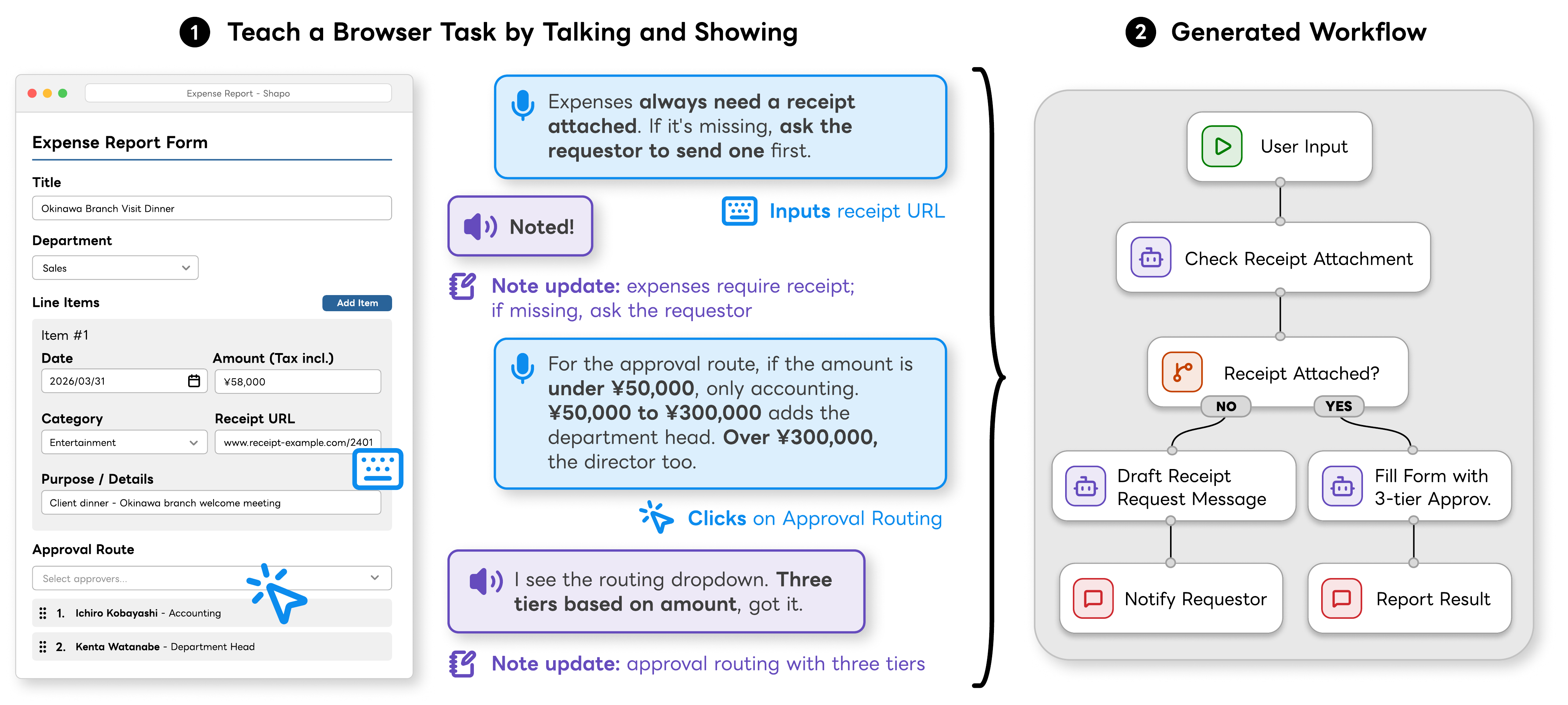
The user works through the task on screen and talks the AI through it, as they would show a new colleague. The AI listens, keeps notes the user can check and correct, and turns them into a workflow when the user is ready.
User study
We compared Teaching with Programming by Demonstration, where the AI learns from what the user does on screen. Both modes shared the same workflow generation. 28 participants, 18 of whom had never programmed, automated office tasks in a simulated corporate portal with both modes. Each workflow was then tested on new emails with cases the participant had not walked through.
Programming by Demonstration
The AI watches what you do. It records that you picked the director, but not why, so the workflow does the same for every request.
Programming by Teaching
You explain the rule while you work. The AI writes it into its notes, and the workflow follows it.
Results
Held-out tests passed
Teaching passed 34 of 39 held-out tests and demonstration 21 of 45 (p = .002). The gap was largest for participants who had never programmed.
Workload and user experience
Teaching also lowered workload, scored higher on user experience, and made it easier to add rules that are not visible in the interface.
Takeaway
Specify first, verify later
Recording a demonstration is the easy part. The effort lands afterward, in finding which rules are missing and where to repair them. Teaching moves that effort up front, into the conversation.
“Finding what to fix” was the hardest part. — P16, P22, P24
“Writing everything into the editor was exhausting.” — P12
Make the AI's understanding visible
The main concern with teaching was not distrust but visibility: participants could not always tell how much the AI had understood. Notes that users can check and correct help; editable rule lists and version diffs are a clear next step.
“I couldn't tell how much it really understood.” — P20
Teaching helps most where editing is hardest
The largest gains were for participants who had never programmed, the group that struggled most with repairing generated workflows. Teaching does not replace demonstration; it complements it.
“I could work as if I were teaching a person.” — P2
BibTeX
@inproceedings{yamazaki2026programmingbyteaching,
  title     = {Programming by Teaching: Authoring Agent Workflows through Voice Conversation},
  author    = {Yamazaki, Takato and Yoshida, Nao and Higuchi, Keita},
  booktitle = {Proceedings of the 39th Annual ACM Symposium on User Interface Software and Technology (UIST '26)},
  year      = {2026},
  address   = {Detroit, MI, USA},
  publisher = {ACM},
  doi       = {10.1145/3830398.3830516}
}