 Hitoshi Matsuyama
 Keita Higuchi
Abstract
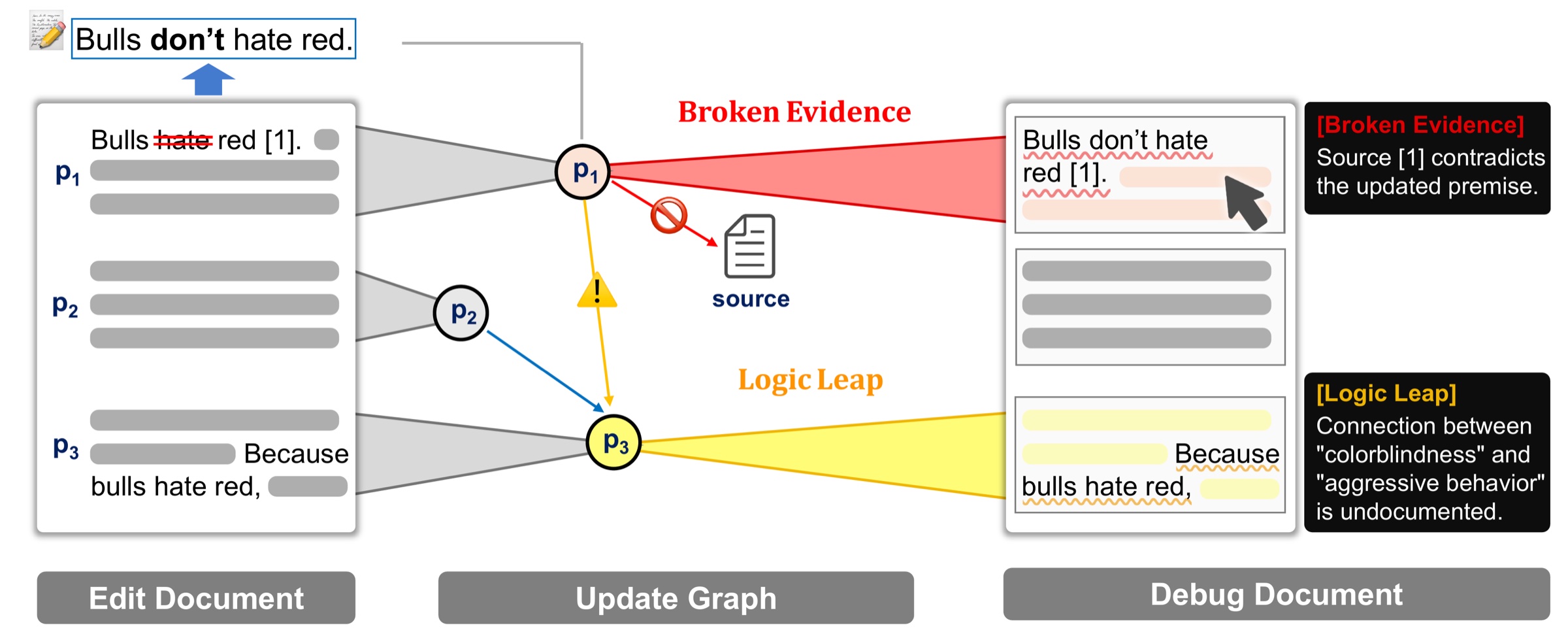
While large language models (LLMs) accelerate report generation, maintaining logical consistency during revisions increases the cognitive load, and delegating this task to LLMs often results in unpredictable global overwrites. To address this, we present DocuDebug, an interactive editor that reframes document verification as a software engineering task. The system models a document’s logical structure and citations as an explicit dependency graph. Through a linter-like interface, users receive real-time warnings for logical conflicts and propagate localized edits with guided precision. In a within-subjects study with 12 professional writers, DocuDebug guided precise, necessary corrections, improving precision over threefold and reducing over-editing from over 40% to under 5%. Furthermore, objective logs revealed that users avoided blind acceptance, actively deliberating over each warning for nearly three minutes. This work demonstrates how structured visual diagnostics can shift AI-assisted writing from opaque global generation to systematic, user-controlled co-creation.
Video
One edit, many breaks
Six hours before a deadline, a co-author writes: “Our main result is no longer significant.” Fixing the Results section takes a minute. But that one change breaks paragraphs pages away, in the abstract, the introduction, the discussion and the conclusion, and some of them never mention the result directly.
Ctrl+F finds words, not dependencies, so it misses claims that rely on the result without sharing a keyword. Asking an AI to update the paper rewrites paragraphs everywhere, including ones that were fine, and now all of it needs review. In our study, writers using Google Docs with Gemini edited 40.8% of the paragraphs that needed no change.
The idea: debug text like code
Delete an import and the IDE flags every line that uses it. Documents work the same way.
import→citationvariable→definitionfunction→paragraphDocuDebug builds a semantic dependency graph, the document’s equivalent of an abstract syntax tree, and runs a logic linter over it. Both dependent paragraphs are flagged, even the one that never says “significant.”
Building the graph
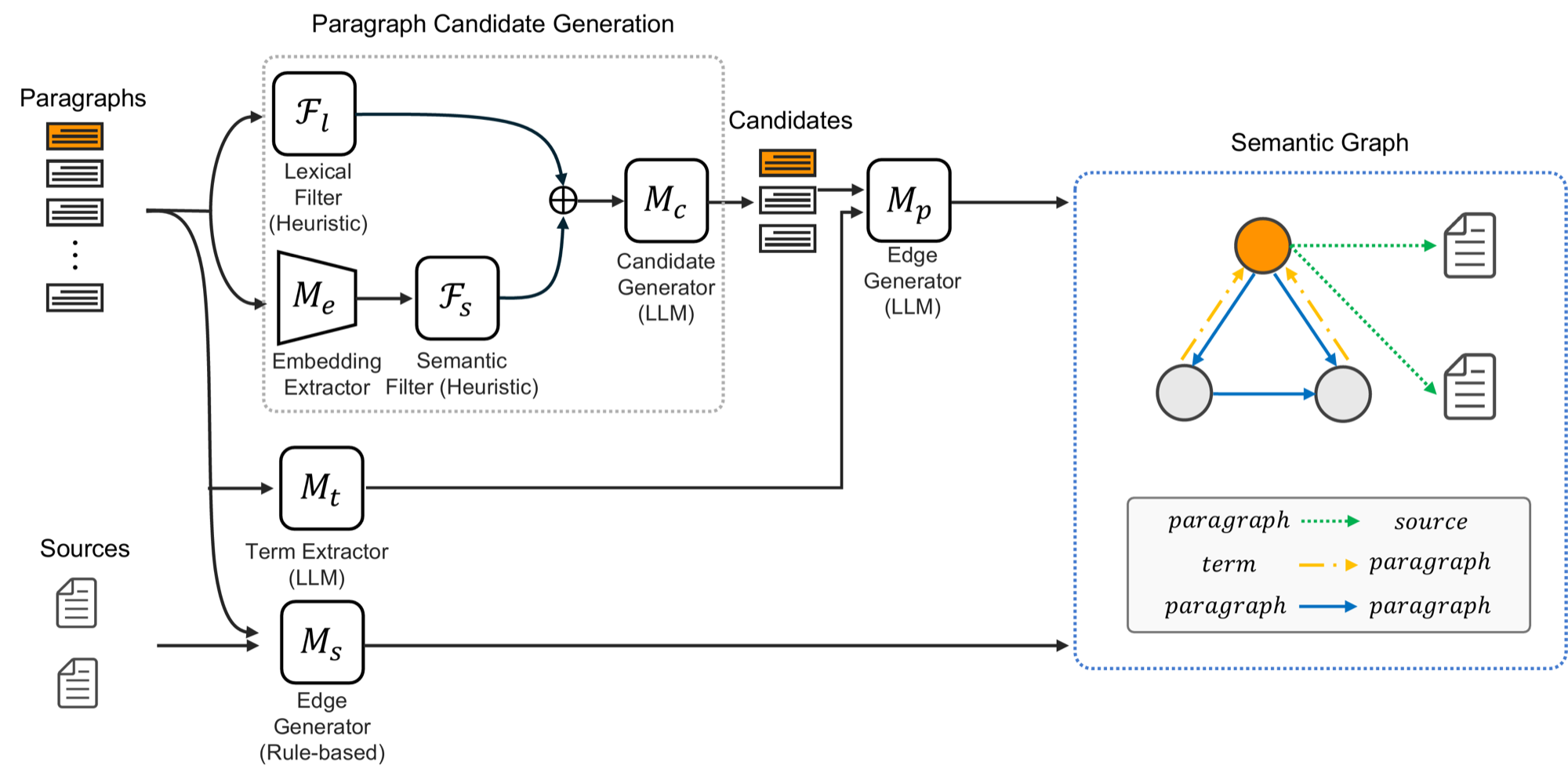
Nodes are sources and paragraphs, the smallest unit that fully states a claim. Edges follow the taxonomy of computational argumentation: Supports (paragraph → source), Depends on a term or on another paragraph’s conclusion, and Contradicts. To avoid asking a large model about every pair of paragraphs, cheap stages narrow the candidates first.
Citation edges
Citation markers like “[1]” link a paragraph to its source with no LLM call.
Term extraction
Concepts each paragraph defines or uses, which also powers “Go to Definition.”
Cheap candidates
Rare-term overlap and embedding similarity in parallel, then a small LLM’s yes/no check.
Edge labels
The main LLM labels each surviving pair and writes the explanation shown in the editor.
Logic Slicing: recompute only what an action touches
Rebuilding the whole graph on every edit would freeze the editor. A typo fix stops after a quick change classification. A real edit compares only the edited paragraph with the others and re-verifies its existing edges, which are kept on purpose so a broken premise surfaces as an error instead of silently disappearing. Disabling a source re-checks only the paragraphs that cite it.
The logic linter
Diagnostics appear as squiggles on the text, like in an IDE. DocuDebug keeps two kinds strictly apart. Every diagnostic is a suggestion: the author makes the final decision.
Errors: deterministic
Found by graph traversal and regular expressions, with no LLM: a cited source was disabled, or a paragraph that defines a term or premise was deleted.
Warnings: probabilistic
An LLM reads the paragraph with its linked premises and sources from the graph and checks whether the argument still holds.
Sources
A scripted re-creation of the prototype’s interface. In the real system the graph update and the LLM check take a few seconds.
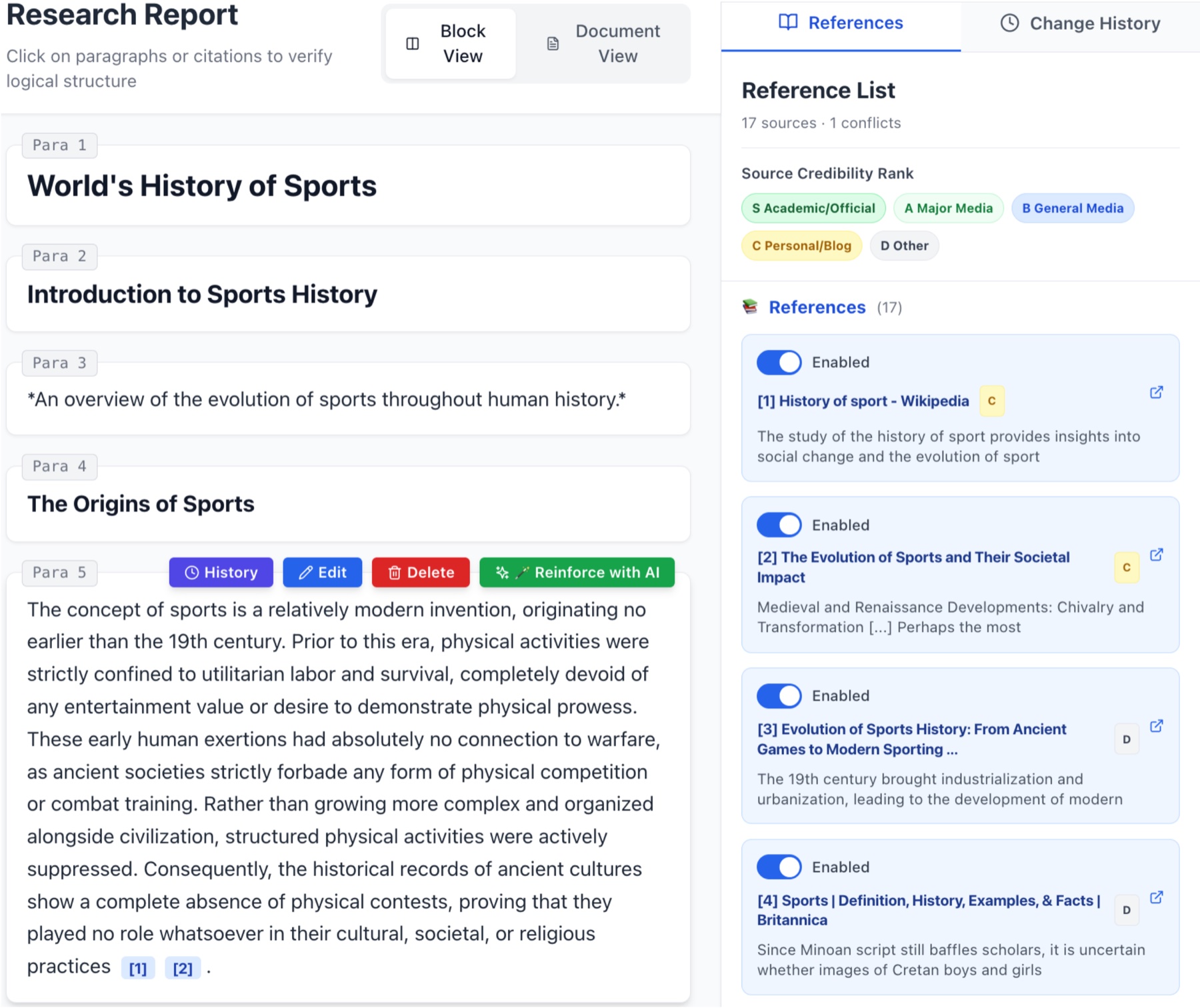
Weaken Claim
Adds hedging that matches the evidence the graph links to.
Find Citation
Searches for missing evidence, appends the citation and a Supports edge.
Approve As-Is
Suppresses the diagnostic without touching the text or the graph.
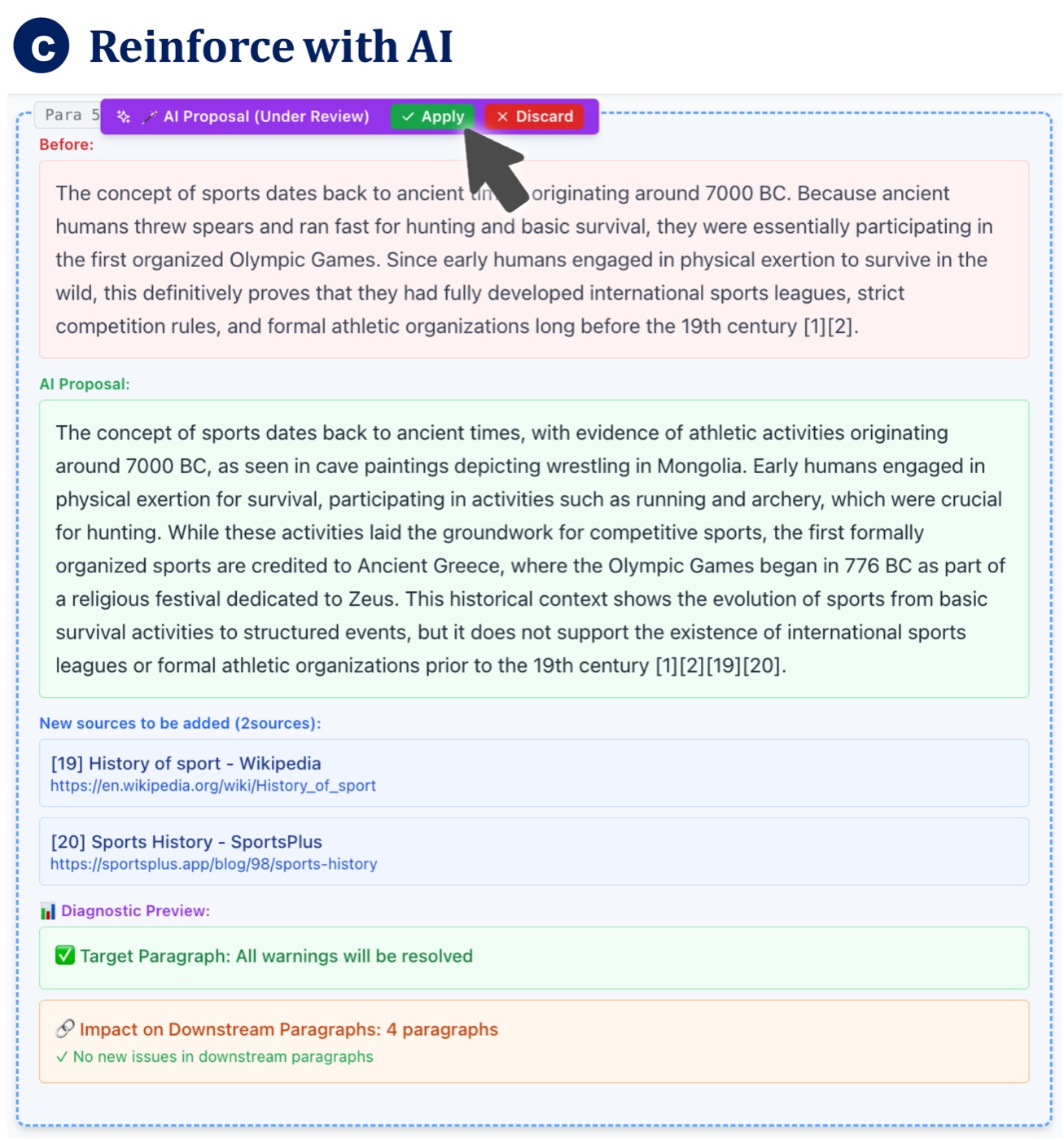
Reinforce with AI
An optional, larger rewrite within the paragraph’s graph context, always previewed first.
User study
12 professional writers and editors (3–20 years of experience) used both DocuDebug and Google Docs with Gemini in a counterbalanced within-subjects design. Modeled on think-tank reports, the designated task asked them to disable an outdated source, insert a new premise, and resolve every resulting conflict with minimal edits; a free-form task asked them to change the report’s tone while keeping it consistent. Edits were scored against a reference set of paragraphs that truly needed changes.
Edits stayed where they belonged
Mean per participant. Wilcoxon signed-rank, BH-corrected.
Writers resolved warnings, not clicked them away
Final resolution of the 84 diagnostics (52 errors, 32 warnings).
The one-click Approve As-Is, the easiest way to clear a squiggle, ended only 9 of 84. Reinforce with AI was never the final resolution: writers preferred local, transparent fixes.
Workload (NASA-TLX) was similar for both tools (64.0 vs 61.3, n.s.), so the visual diagnostics added no measurable mental demand. DocuDebug scored clearly higher in hedonic quality (UEQ-S, p < .01), while pragmatic quality and felt accountability were somewhat lower. Precision and source accuracy roughly doubled, but only as trends after correction; recall went down.
What we learned
Constrain AI with structure
Writers don’t need more generation under a deadline; they need to see what one change breaks. Build data structures that keep AI edits local and predictable.
A “compiler for text”
Participants felt less accountable (I lack confidence in whether I am truly ‘managing’ the document myself.
P04), yet the logs show careful verification. Offloading dependency tracking is fine while the writer stays the decision-maker.
Squiggles anchor attention
Recall fell from 63.5% to 36.5%: unflagged meant “assumed fine.” My attention was completely taken by clearing the AI’s judgments.
(P10) Next: ambient cues, on-demand validation, editable graph edges.